
Online Advertising Platform Explained: What It Does, How Bids Work, What It Costs to Start
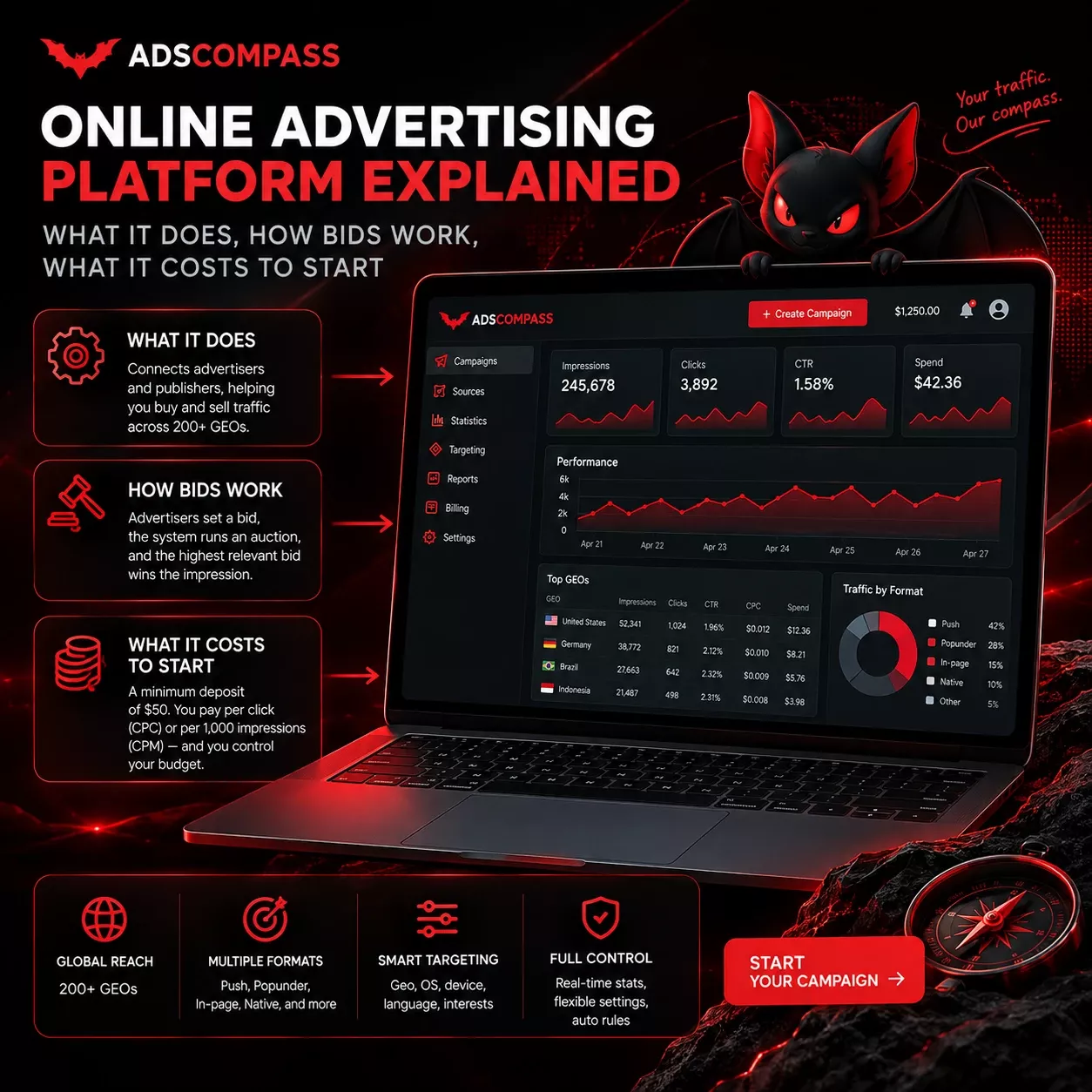
An online advertising platform matches advertisers buying traffic with publishers selling ad space, prices it by auction as the page loads, and charges entry in two parts: a deposit to open the account and a daily budget the advertiser sets. The winning price is set in the auction itself. On AdsCompass the buyer picks one of eight ad formats, names a bid and pays exactly that bid on winning.
An Online Advertising Platform Serves Three Different Roles From One Auction
One auction serves three roles through separate entry points: advertisers who buy, publishers who sell, and other networks that plug their own supply or demand in over RTB. The roles do not share an interface, because each needs a different set of controls, and most platforms of this kind keep the buying and selling accounts apart for that reason.
"Online advertising platform" is the umbrella term for all of this, and the narrower words name specific layers. An ad network aggregates publisher inventory and resells it as packages. An ad exchange runs the auction that matches the two sides, an SSP sells publisher inventory into that auction, and a DSP buys across it on the advertiser's rules. Most products sit on one or two of those layers and buy the rest from partners.
AdsCompass runs the exchange, the SSP and the DSP in a single engine on the OpenRTB protocol maintained by the IAB Tech Lab, and takes additional supply from partner networks over the same protocol. Advertiser and publisher registrations are separate and cannot be merged into one login, while exchange partners get no self-serve entrance and connect through a manager. For a buyer the practical effect is that the bid, the targeting and the source list stay in your hands instead of arriving as a prepared package.
One Impression Is Bought and Delivered in Six Steps
Six steps separate a page load from a rendered ad, and the whole sequence closes before the page finishes drawing. Each one is automated, and none of them involves a human on either side of the trade.
- A user opens a page or an app, and the publisher's tag fires a bid request.
- The request describes the impression: GEO, device, operating system, browser, format and page category. It carries no name or email.
- The SSP passes the request to the exchange, which broadcasts it to every connected buyer.
- Each buyer's rules decide whether the impression matches an active campaign, and return a bid if it does.
- The auction settles. Under first-price rules the highest bid wins and pays what it bid.
- The winning creative is returned to the page and rendered. The publisher is credited, the advertiser is charged.
Everything an advertiser configures on an online advertising platform is a filter applied at step four, before the auction opens. Bid, targeting, source rules and frequency cap all decide which auctions the campaign enters rather than what it pays once inside one. That distinction explains why a narrow campaign can spend less and still lose fewer impressions than a broad one.
Ad Formats Determine Where the Ad Appears and Which Pricing Model Applies
Ad formats split by where the ad sits relative to the content: inside the flow (native, in-app), around it (banner, video), or outside the page altogether (pop, push notifications). Each placement carries its own pricing model, so choosing a format settles both where the ad shows and what triggers payment.
AdsCompass runs eight of them on the buying side and opens six to publishers, a selection from a wider market rather than all of it. The choice is locked at creation: the campaign builder states plainly that ad format cannot be changed after a campaign is created, so testing a second format means a second campaign.
The two Telegram Rewarded formats arrived in February 2025 and stayed buy-side only, which is the one asymmetry worth flagging: publishers cannot monetise Telegram Mini App traffic and work with the other six. Advertisers get a wider menu.
| Format | Where it appears | Advertisers buy | Publishers monetize |
|---|---|---|---|
| Pop | Separate browser window, triggered by a click on the page | Yes | Yes |
| Push | System notification on the device | Yes | Yes |
| In-page push | Notification-style block inside the page | Yes | Yes |
| Native | Inside the content feed, styled to match | Yes | Yes |
| Banner | Fixed display block | Yes | Yes |
| Video pre-roll | Before video content | Yes | Yes |
| Telegram Rewarded Post | Inside Telegram Mini Apps | Yes | No |
| Telegram Rewarded Video | Inside Telegram Mini Apps | Yes | No |
Push and in-page push differ by whether the user subscribed
Push reaches a user who has already subscribed to notifications from a site, which is why it arrives as a system notification and shows up even when the browser tab is closed. In-page push imitates that look inside an open page and needs no subscription, so it reaches iOS users and anyone who has never clicked "allow". The creatives look almost the same, but the audiences are not: push works with a warmed subscriber list, while in-page push works with whoever happens to be on the page right now.
Pricing Splits Into CPC and CPM, and the Format Decides Which One You Get
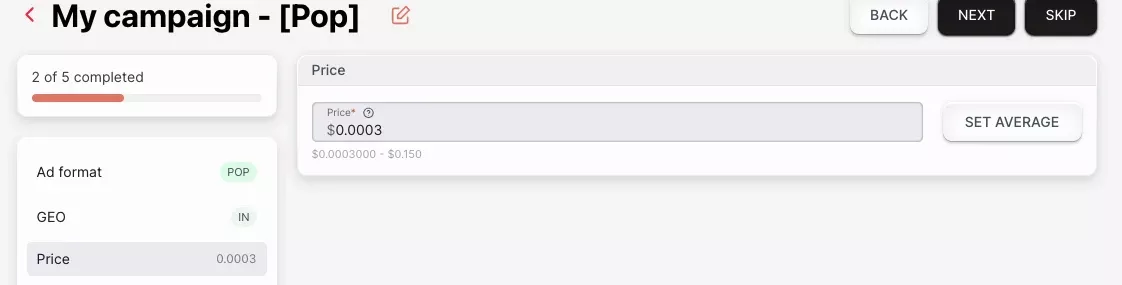
Pricing on AdsCompass runs on CPC and CPM only, and the format decides which of the two applies before an advertiser sets anything. The wider market sells on more models than that: CPA per action, CPL per lead, CPI per install, plus revenue share and flat deals. Here pop, push and in-page push run on CPC, while banner, native, video pre-roll and both Telegram formats run on CPM. The bid field shows a range rather than a single floor, bounded at both ends: pop in IN runs from $0.0003 to $0.150 per click. The two scales are quoted in different units:
| Format | Model | Minimum bid |
|---|---|---|
| Pop | CPC | $0.0003 per click |
| In-page push | CPC | $0.0008 per click |
| Push | CPC | $0.001 per click |
| Banner | CPM | $0.001 per 1,000 impressions |
| Telegram Rewarded Post | CPM | $0.01 per 1,000 impressions |
| Native | CPM | $0.10 per 1,000 impressions |
| Video pre-roll | CPM | $0.10 per 1,000 impressions |
| Telegram Rewarded Video | CPM | $0.10 per 1,000 impressions |
The choice between the two models is a choice about who carries delivery risk. On CPC that risk sits with the platform, because an impression nobody clicks costs the advertiser nothing. On CPM it sits with the advertiser, which pays off for video and native, where the creative does its work on sight.
A CPC floor and a CPM floor are not comparable numbers
The pop, push and in-page push floors on AdsCompass - $0.0003, $0.001 and $0.0008 - are priced per click, not per thousand impressions, and in the account the bid field for those three formats is labelled CPC. Published comparisons keep going wrong at exactly that point: they line $0.0003 up against a $0.001 banner CPM and read it as the cheaper impression. One is three hundredths of a cent for a single click. The other is a tenth of a cent for a thousand views.
eCPM is what makes the two comparable: multiply the click price by the click-through rate, then by 1,000. A $0.0003 click at a 0.5% CTR works out to an eCPM of $0.0015, above a $0.001 banner CPM, even though the headline number looks three times smaller. Run that conversion before comparing any two floors. Set a pop bid as though it were a CPM and the campaign spends at roughly a thousand times the rate you expected.
A First-Price Auction Charges the Winner Exactly What the Winner Bid
AdsCompass runs a first-price auction and nothing else, so the winner is charged exactly what the winner bid. Part of the market still settles on second price, where the winner pays a fraction above the runner-up and an overbid is quietly trimmed back by the mechanic itself. Here it is not trimmed: a bid typed with an extra zero is spent with the extra zero, and the daily budget is the only limit that stops it.
First-price bidding is also why an online advertising platform of this kind publishes no rate card, which both sides ask about constantly. There are no static values to publish. What a click or a thousand impressions is worth follows the bids advertisers are placing for that audience at that moment, the audience a site actually has in terms of GEO and device, and the format the ad runs in. Any printed number would be wrong within the hour.
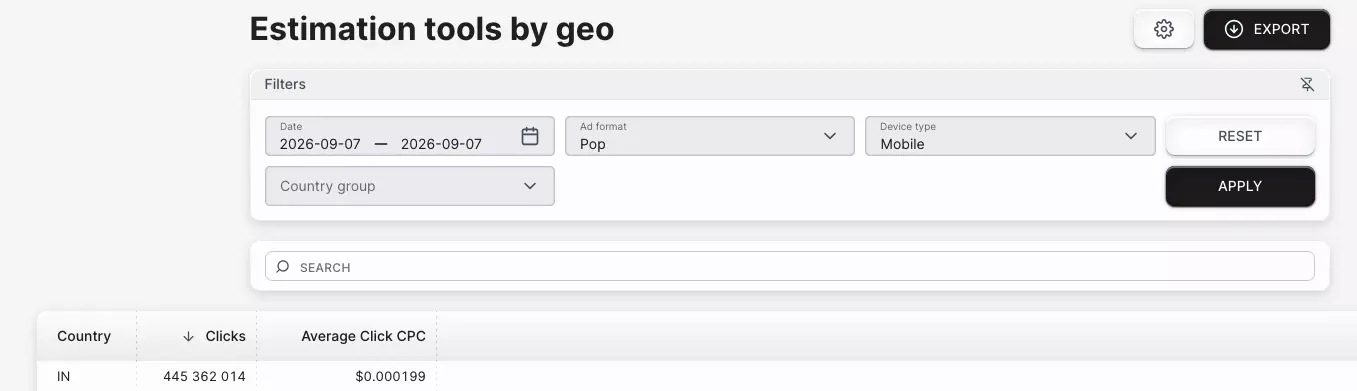
What stands in for a rate card is the estimation tools section of the account, where the AdsCompass traffic calculator sits. It reads average bids off auctions that have already closed and moves as new ones settle, filtered by date range, ad format and device type, with the result shown per country as clicks and Average Click CPC. The recommendation then shifts with the goal you set: buy the cheapest clicks in a GEO and format, or buy the largest volume of clicks available. Open it twice for the same country with the goal switched and it returns two different suggested bids, which is as close to a price list as this kind of platform gets.
Targeting Narrows the Audience Before the Auction Runs
Targeting on an online advertising platform filters inventory before the bidding starts, so a narrow setup enters fewer auctions at higher relevance instead of all of them at lower relevance. The AdsCompass account carries the standard layer: GEO down to city level across 200+ countries, device, OS and version, browser and version, ISP or mobile carrier, browser language, connection type, and retargeting.
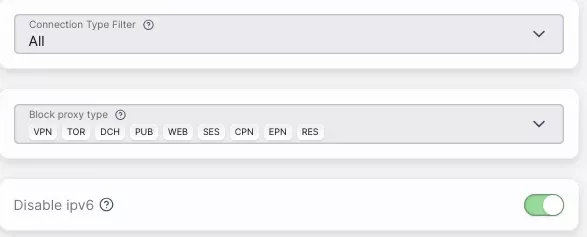
Two AdsCompass targeting filters are rarer than the rest: a Disable IPv6 switch and a Block proxy type selector that lists nine categories separately - VPN, TOR, DCH, PUB, WEB, SES, CPN, EPN and RES. Blocking by category rather than by a single proxy flag is what makes the filter usable: datacentre and residential proxies behave differently, and an advertiser can cut one without losing the other. Neither filter amounts to a fraud solution on its own, but both remove a slice of automated traffic before it costs anything. This is the part of the targeting panel I most often find left at its default when an advertiser asks why a campaign is delivering clicks that go nowhere.
Pacing controls sit alongside targeting. There is a frequency cap per unique IP per day, dayparting by hour and weekday with a selectable timezone, and a spend mode with two settings. Even spending keeps a small budget alive across the whole day, while fast spend gathers data sooner and can empty the budget before the hours that convert best.
Source ID bidding prices individual traffic sources separately
Source ID bidding lets one campaign hold different bids for different traffic sources instead of one bid for all of them. You upload the source IDs in advance and attach a rule, then raise the bid where conversions are landing and cut it where clicks arrive without results. Blacklists and whitelists by IP, ISP and source ID work in the same place, and the Audiences section stores retargeting lists with their own collection rules and retention period.
Without per-source control, good and bad inventory average into one price and the campaign pays that price for both. Where traffic is sold by source ID, that averaging is where most of the waste hides.
Entry Costs $50 to Open the Account, and the Advertiser Sets the Daily Budget
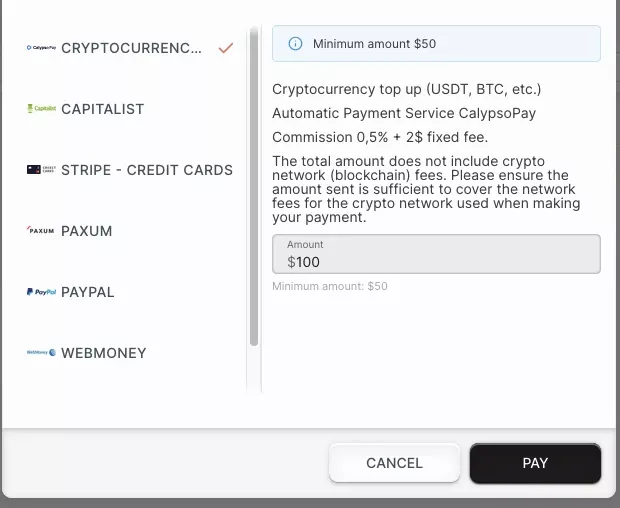
The minimum deposit on AdsCompass is $50, and the daily budget has no default value and no platform floor: the advertiser sets it outright. Deposits go through Capitalist, USDT TRC-20, BTC, PayPal, Paxum, WebMoney, wire transfer, and Visa or Mastercard including Apple Pay and Google Pay, all in USD. Spend earns cashback from 1%, rising with volume.
No recommended daily figure exists, and the reason is the spread of what runs on the platform. An offer worth a dollar a day and an offer worth a thousand sit in the same auction with different targeting behind each, so a number that suits one is wrong for the other. One rule holds, and only for the first stage of testing a source: the daily budget is the total budget divided by the days set aside to collect data. Allow $500 and five days for a single campaign and that comes to $100 a day. Past the testing stage the arithmetic stops applying.
The failure I see most often on sales calls comes from ignoring how thin that spreads. An advertiser funds the $50 minimum, runs it flat across three GEOs and closes the test convinced the source does not convert. One push campaign in one GEO returns traffic from dozens of source IDs, and each of them ends up with a handful of clicks, which is not enough for a conversion rate to mean anything.
Reading any of this depends on attribution, which no advertising platform does on its own. The platform sees the click and stops, because the conversion happens on the advertiser's site. A click ID passed into the landing page URL and returned by a server-to-server postback closes that loop; without it, a report shows spend by source and nothing more.
Campaigns Are Rejected for Three Recurring Reasons
Three things get a campaign rejected on AdsCompass: a terms and conditions violation, a malformed campaign link, and a link whose domain carries a high number of VirusTotal alerts. Violence, weapons and drugs are refused in every format. A campaign with none of that on it clears moderation in ten minutes. Anything a human has to open takes longer, and the queue gives no estimate while it waits.
Two of those three rejection reasons live in the link, so give it a second pass before submitting. A tracking URL that a macro has broken comes back rejected. So does a domain already flagged by scanners, and neither problem is visible from inside the campaign builder until the queue returns its verdict.
Publisher Tools and Payout Terms on the Selling Side
Publishers reach AdsCompass through their own toolkit and their own payment schedule: JS tags, a direct link and widgets across six formats, with RTB partners paid Net30 from the invoice date. Every site is reviewed before it goes live rather than after, which is standard on platforms that resell inventory into an open auction.
What a site earns is decided by the same auction, so there is no fixed rate per click or per thousand impressions on the selling side either. The payout follows advertiser bids for that traffic, the GEO and devices the site actually brings, and the format the widget runs. Two sites carrying the same format can earn very different amounts on the same day.
Payment terms differ by how the publisher is connected. Individual terms are open to negotiation on the RTB side, while direct publishers sit outside that schedule and withdraw on request from $50.
FAQ
How much does online advertising cost?

What is the difference between an online advertising platform and an ad network?
Is CPC or CPM better for a first campaign?
Do you need a tracker to run ads on an online advertising platform?