
Interstitial Ads - Definition, Delivery and Placement Rules

Interstitial ads are full-screen units that appear between two stages of a user flow. The creative is cached before the transition, then takes over the entire viewport until the user closes it, replacing the screen instead of sharing it with content.
Three rulebooks decide where the format runs. Google Play rejects updates when an unexpected full-screen ad cannot be closed within 15 seconds, the Better Ads Standards ban prestitials that load before content, and Google search treats intrusive mobile interstitials as a ranking signal.
Interstitial Ad Definition: The Two Defining Properties
Interstitial ads have two characteristics: they take up the entire screen and appear between actions, rather than within the content.
Remove either of these characteristics, and you get a different format:
- Full-screen, but triggered by the user → rewarded ads
- Full-screen, but opening in a separate window → popunders
- Takes up only part of the screen; the user can continue scrolling → sticky ads
Advertisers pay for the interval between actions. Between two levels of a game, after submitting a form, between two articles - the user has finished one action and hasn’t started the next one yet. For a second or two, their attention is free.
The Coalition for Better Ads tested all three on real users. Prestitials and poststitials scored below the level people consider acceptable, among the lowest ratings of any format and the most strongly correlated with installing an ad blocker. The transition interstitial did not.
| Format | Fires | Web standards status |
|---|---|---|
| Prestitial | Before the content loads | Beneath the standard on mobile web, and on desktop with a countdown |
| Interstitial | At a break between two completed steps | Compliant |
| Poststitial | After the content, before the user moves on | Beneath the standard on mobile web when a countdown is required |
Creative comes as static image, video, rich media, playable, or rewarded video presented full screen. The first four run without consent; the fifth is opt-in, and every rulebook treats it separately. Two IAB Tech Lab specifications govern behavior once the creative is served: VAST for video delivery, MRAID for how rich media and playables handle expansion, resize and close.
How Interstitial Ads Work: Request, Cache, Display
Interstitial ads appear on the screen in five stages, with the ad creative loading before the transition rather than at the moment of display.
- Request. The publisher's SDK or tag asks for an ad ahead of the expected transition.
- Mediation. This layer decides which ad networks to call, in what order, or whether they all bid in one auction.
- Auction. Bids come in through real time bidding, a winner is picked.
- Cache. The creative is stored on the device or in the page.
- Display. The app or page calls the show method when the transition happens.
Break the order and the format stops working.
Loading at the moment of transition. The user stares at a spinner while the auction runs. The exchange only gets as long to respond as the seller allows in the bid request - that window is short, and it starts when the user is already waiting.
Bad caching causes two failures. Both look like a broken app, not bad advertising:
- Stale cache - nothing appears, because the campaign ran out of budget after the creative was saved.
- Double show - two cached interstitials fire back to back when two transition events land in the same second.
Fill rate is the percentage of ad requests that get a creative back. It is not the same as bid-to-impression, which also counts auctions with no bid and creatives that were cached but never shown. Track them separately. Merge them and you'll blame demand for a delivery problem.
Interstitial Ads Compared With Other Ad Formats
Interstitial ads sit between banners and rewarded video on every axis that matters: they earn more than passive display, less than opt-in video, and they cost more in user tolerance than either.
| Format | Screen share | User consent | Typical trigger | Main risk |
|---|---|---|---|---|
| Interstitial | Full screen | None | Transition between steps | Retention drop, policy violations |
| Banner | Fixed strip | None | Persistent on screen | Low revenue per impression |
| In-page push | Small in-content block | None | On scroll or timer | Ignored if placed low |
| Popunder | Full window, behind | None | On click or page load | Blocked by browsers, poor viewability |
| Native | In-feed unit | None | Inside content flow | Needs feed-like design to work |
| Video pre-roll | Full player | None | Before video content | Abandonment before content |
| Rewarded video | Full screen | Explicit opt-in | User taps to earn a reward | Reward economy must be balanced |
Interstitial ads and banner ads trade volume for value
A banner earns a little on almost every screen; an interstitial ad earns a lot on a small fraction of them. In-app inventory carries the higher engagement of the two environments overall: Business of Apps puts in-app click-through at around 0.56% against 0.23% on mobile web.
The two formats also fail differently. A weak banner setup quietly underperforms. A weak interstitial setup damages retention, and that loss surfaces in product metrics where the ad report never looks.
Interstitial ads and pop-ups differ by when they fire
A pop-up interrupts a task in progress, an interstitial ad waits for the task to end: the pop-up lands over the page while the user is reading, the interstitial at a break, after the level is finished or the form submitted. The Coalition for Better Ads names pop-ups on both its desktop and mobile web lists, and names no transition interstitial on either.
Advantages and Disadvantages of Interstitial Ads
Interstitial ads trade users’ tolerance for their attention, and every item on both lists stems precisely from that trade.
In terms of advantages: the entire viewing screen is dedicated to a single message, so visibility is essentially guaranteed. The ad unit has space for videos, interactive elements, and multimedia that a banner cannot accommodate; revenue per impression significantly exceeds that of a passive display, and placement is predictable enough to be planned around the session structure.
On the other hand, interrupting a session leads to user churn if it occurs at an inopportune moment, and this churn is reflected in the product’s metrics sooner than anywhere else. Three separate sets of rules limit where and for how long an ad unit can be displayed. Delivery relies on caching, and any failures in the caching process go unnoticed. And the volume of ad inventory is limited by the number of actual clicks in a session, so it cannot be scaled in the same way as banner ad volume.
When an Interstitial Ad Is the Right Format
Interstitial ads are effective when a session has clear structural breaks and ineffective when it does not; this criterion allows us to predict most of the outcome even before the question of ad frequency arises. It works better during long sessions because, for the same cost of ad space, it distracts users proportionally less. It is ineffective during continuous scrolling, where there are no breaks and each ad appears in the middle of a task, as well as during checkout or registration, where an interruption results in a lost conversion whose value exceeds the cost of the ad impression.
| Product type | Works at | Avoid |
|---|---|---|
| Hypercasual and casual games | Level end, after the score screen | Level start, during play |
| Midcore and strategy games | Return to menu, mission summary | Mid-mission, timed events |
| Utility apps | After a completed task | During the task, at app launch |
| News and long-form content | Between articles, at a pagination break | Mid-article, on the search entry page |
| E-commerce | After order confirmation | Cart, checkout, product browsing |
| Streaming and video | Use the pre-roll slot instead | Mid-playback |
| Social feeds | Not a fit, no session seam exists | Anywhere in the scroll |
Interstitial Ad Frequency Cap: How Often to Show Them
Set the cap against the number of natural transitions a session contains rather than against a fixed number of minutes. One in three transitions is conservative. One in two is aggressive. A cap in minutes only works if you know the session length it assumes: one interstitial per three minutes is heavy at four-minute sessions and light at twenty-minute ones.
Which cap you can afford is a measurement question. Hold out 10% of users with the format off, run it at least fourteen days so the second retention checkpoint lands inside the window, and compare the groups on ARPDAU together with D1 and D7. Decide on total revenue per user, with ad revenue as one input among several. A cap that lifts ad revenue 15% while costing 3 points of D7 is usually a net loss, and the ad report by itself will never show it.
Interstitial Ad Best Practices
Interstitial ads succeed or leak on eight rules, and they fall into three groups: where the unit fires, how the creative is built, and what gets measured after launch. None is expensive to implement, and each addresses a failure that only shows up once the format is live - a rejected update, an empty screen where a creative should be, a retention drop the ad report never explains.
- Fire only on completed actions. A finished level, a submitted form, a confirmed order. Any trigger that blocks an intent the user just expressed is the one that draws both policy enforcement and churn.
- Pre-cache one creative ahead and refresh it. Cache before the transition, and re-request if the transition has not arrived for several minutes, so a budget-exhausted campaign does not render an empty screen.
- Lock display to one show per transition. A single display flag prevents two events in the same second from stacking two interstitials.
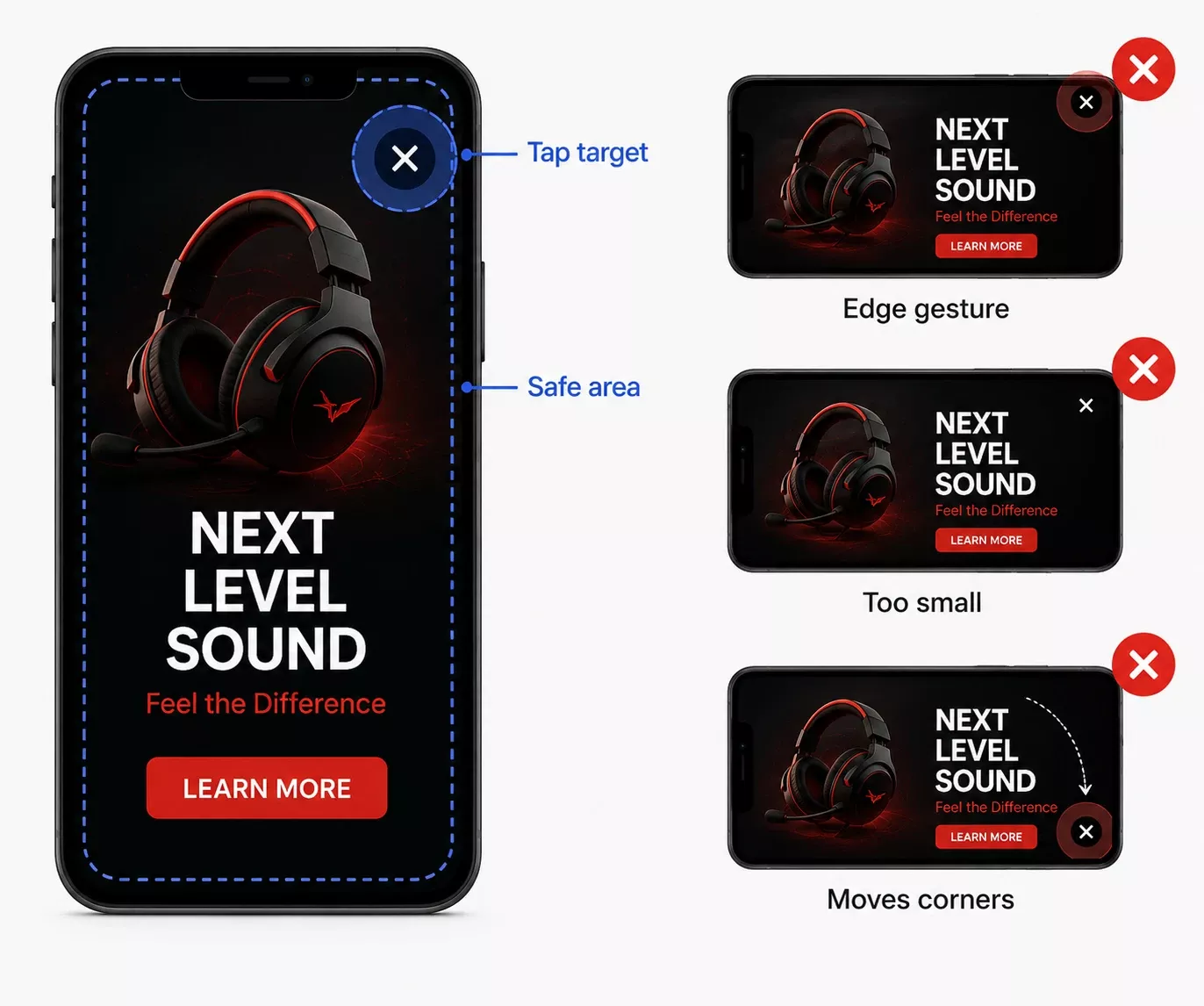
- Give the close control a fixed position and a real tap target. Keep it in the same corner across creatives, inside the device safe area, and large enough to hit without zooming.
- Keep creative weight low and provide a static fallback. A heavy video that fails to render on a slow connection costs the impression and the session at the same time.
- Suppress the format during a new user's first session. It has the sharpest effect on people who have not yet decided to stay.
- Log time to close, closes inside two seconds, empty renders and impressions per session. A rising share of instant closes means the trigger point needs moving before the frequency does.
- Check how any benchmark counts a click before comparing yourself to it. Unfiltered taps near a close control inflate click-through and make a badly placed button look like strong performance.
Google Search Rules for Interstitials on Mobile Web
Google has demoted mobile pages with intrusive interstitials since January 10, 2017. The signal targets interstitial ads that cover the main content immediately after arrival from search results, and standalone interstitials that must be dismissed before the content is reachable. Google's guidance on intrusive interstitials exempts cookie consent notices required by law, age verification gates, and banners using a reasonable share of the screen.
A fourth exemption is practical rather than written as a carve-out: the signal applies to the page the user lands on from search, so an interstitial one click deeper does not carry the same risk. Move the unit off the entry page and you keep both the revenue and the position.
Google Play Rules for Interstitial Ads in Android Apps
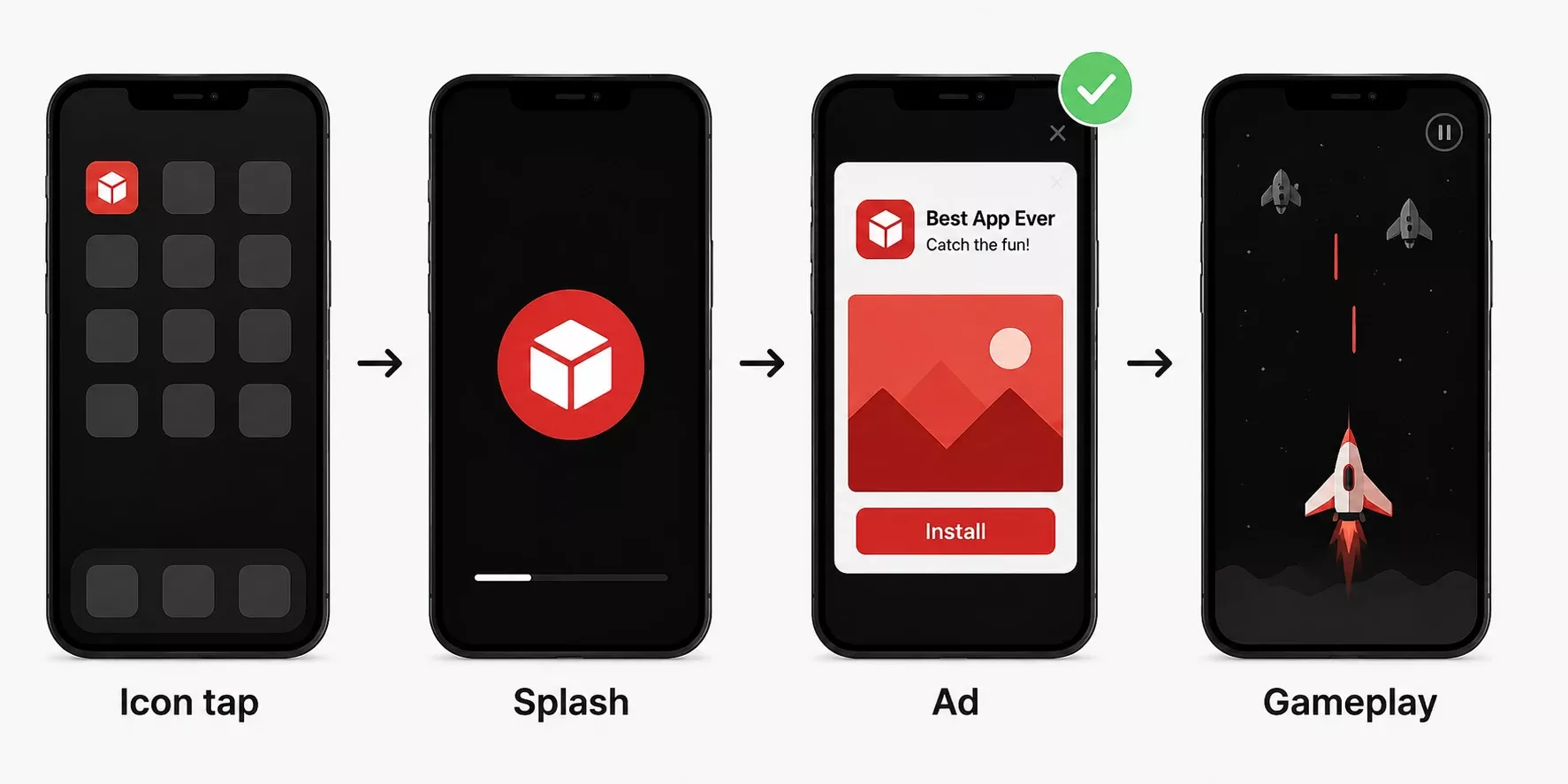
Google Play requires an interstitial to be closable after 15 seconds. The rule has been in force since September 30, 2022, under the Better Ads Experiences policy, and it doesn't apply to opt-in formats or to interstitials that don't interrupt an action. Three placements are banned outright: before the app's loading screen, at the start of a level, and during gameplay. The correct order is a tap on the icon, then the splash screen, then the ad.
The rule comes from the Better Ads Standard for Mobile Apps, published by the Coalition for Better Ads on November 2, 2021. Four in-app experiences fell below the threshold:
- interruptive interstitials
- interruptive video interstitials
- non-skippable interruptive video interstitials
- video interstitials on app open
The exemptions matter as much as the failures. Interstitials at the end of gameplay, at the end of a content segment, after a score screen, and static interstitials on app open all pass.
Rewarded formats sit outside the policy entirely, because the user opted in. A publisher who needs interstitial inventory but can't live with the 15-second limit has a route: make it opt-in.
iOS brings different constraints, none of them about timing. Apple enforces through App Review rather than a published limit, so the Play rule doesn't carry over. What changes instead is targeting and measurement:
- Since iOS 14.5, App Tracking Transparency requires explicit permission before tracking. Most users decline, so interstitial demand leans on contextual signals.
- Install attribution runs through SKAdNetwork - aggregated, delayed postbacks.
On the web the equivalent constraint is consent: a full-screen unit served before a valid consent signal exists is a compliance problem no matter how well it performs.
Better Ads Standards for Desktop and Mobile Web
Eight mobile web ad experiences and four desktop ones fall beneath the Better Ads Standards, and full-screen formats dominate both lists. Mobile web: pop-up ads, prestitial ads, ad density above 30%, flashing animated ads, auto-playing video ads with sound, poststitial ads with a countdown, full-screen scrollover ads, and large sticky ads. Desktop: pop-up ads, auto-playing video ads with sound, prestitial ads with a countdown, and large sticky ads.
Four more experiences have since been added to the published standards: on desktop, ad density above 50% and density above 30% combined with a sticky video ad; on mobile web, sticky pop-out video ads and sticky video paired with a large inline ad.
A prestitial fails on both lists. A transition interstitial appears on neither. The threshold is aimed at advertising that stands between the user and the thing they came for, not at full-screen advertising as such.
FAQ
What size should an interstitial creative be?

Can an interstitial be skipped, or only closed?
Are rewarded interstitials the same as interstitial ads?
Do interstitial ads count as viewable impressions?
Do interstitial ads affect Core Web Vitals?
Can users block interstitial ads?
Do interstitial ads work on desktop web?