


Popunder Ads for Advertisers and Publishers on AdsCompass
Popunder adverts on AdsCompass operate within a single auction on both sides: advertisers purchase popunder traffic at a price starting from $0.0003 per click, publishers monetise popunder placements on their websites, whilst partner SSPs and DSPs connect to the same auction via RTB. This format opens a full-page window in a separate browser tab behind the page the user is already viewing; therefore, there is no creative design, and the landing page itself constitutes the advert.
AdsCompass Accounts, Payments and Support
AdsCompass maintains advertiser and publisher balances in U.S. dollars, accepts deposits and processes payments using the same methods, and answers questions through a personal account manager and via Telegram chat in English and Russian. The table below outlines the operational aspects of managing an account; pricing, targeting, and payout terms are discussed below.
| Parameter | Detail |
|---|---|
| Currency | USD for both advertiser and publisher balances |
| Deposit and withdrawal methods | Capitalist, USDT TRC-20, BTC, PayPal, Visa and Mastercard, Apple Pay, Google Pay, Paxum, WebMoney, wire transfer |
| Audience tools | Retargeting audiences with list upload, auto-collection rules and a set storage period; SST Pixel for audience collection |
| Exchange integration | oRTB, XML and JSON feeds for SSP and DSP partners, onboarded through a manager |
| Documentation | Separate advertiser and publisher sections inside the account |
| Support | Personal manager, Telegram chat around the clock, English and Russian |
How Popunder Ads Work
Popunder ads work as follows: when you click anywhere on a publisher’s page, a new full-screen window opens behind the window that is currently in focus. It is precisely this feature - appearing behind rather than in front of the current window - that distinguishes this format from all others. All four formats listed below fall under the umbrella term “popup ads” (pop ads or pops advertising), and advertisers use these terms in a broad sense; however, each one captures attention at a different moment.
| Format | Where it opens | When the user sees it |
|---|---|---|
| Popunder | New window behind the active one | After the front window is closed or minimized |
| Popup | New window on top of the active one | Immediately, interrupting the page |
| Tab-under | New background browser tab | When the user reaches that tab |
| Interstitial | Same window, between two page views | Immediately, between clicks |
Popunder ads also travel under other names in the trade. Onclick ads, clickunder and pops all describe the same buy, and the tag a publisher installs is usually called a popunder script or popunder code.
Since a popunder does not overlay the active page, it never interrupts the session the way a pop-up window does. The trade-off is that attention is captured belatedly and unexpectedly: a user who has closed a video and sees an unfamiliar page with an offer does not remember requesting it, so the page must explain what it is within one or two seconds after it has caught the user’s attention.
AdsCompass partners with more than 5,000 publishers and more than 15,000 advertisers and processes more than 30 billion bid requests per day across all eight of its ad formats, not just popunders.
How to Evaluate a Popunder Ad Network
A network that sells popunder ads is evaluated based on seven criteria, and the format itself is not included among them, since popunders function identically regardless of where they are displayed. The differences lie in how the network sets prices for ad placements, the level of control it provides to advertisers, and which ads it allows to participate in the auction.
| Criterion | What to check | AdsCompass |
|---|---|---|
| Auction type | First-price or second-price, and whether bids get shaded | First-price, no shading |
| Billing event | Per click or per thousand impressions; the two are not comparable | CPC on pop, from $0.0003 |
| Source-level control | Individual bids per source ID, or one price for the whole GEO | Per-source bids and lists |
| Pre-bid filters | IPv6 and proxy exclusion, black and white lists by IP and ISP | All set at campaign level |
| Publisher admission | Premoderation of every site, or open self-signup | Every site premoderated |
| Payout terms | Minimums and schedules on both sides of the platform | $50 deposit, Net30 publisher payouts |
| Tracker integration | Documented integrations and the macro set for S2S | Seven macros, four trackers by template |
Two of these decide more than the rest. The billing event determines whether an unregistered window still costs money, and source-level control determines whether a bad slice of a GEO can be cut without abandoning the GEO. A network that reports only GEO totals leaves both problems open.
How Popunder Ads Are Delivered and Billed on AdsCompass
Popunder ads on AdsCompass are delivered off a user action on the publisher's page, and billing starts a moment later, when the opened window registers as a click. The publisher's tag fires a bid request, the network passes it into an OpenRTB auction, bidders respond with a price and a destination URL, the highest bid wins, and that URL loads into a new window.
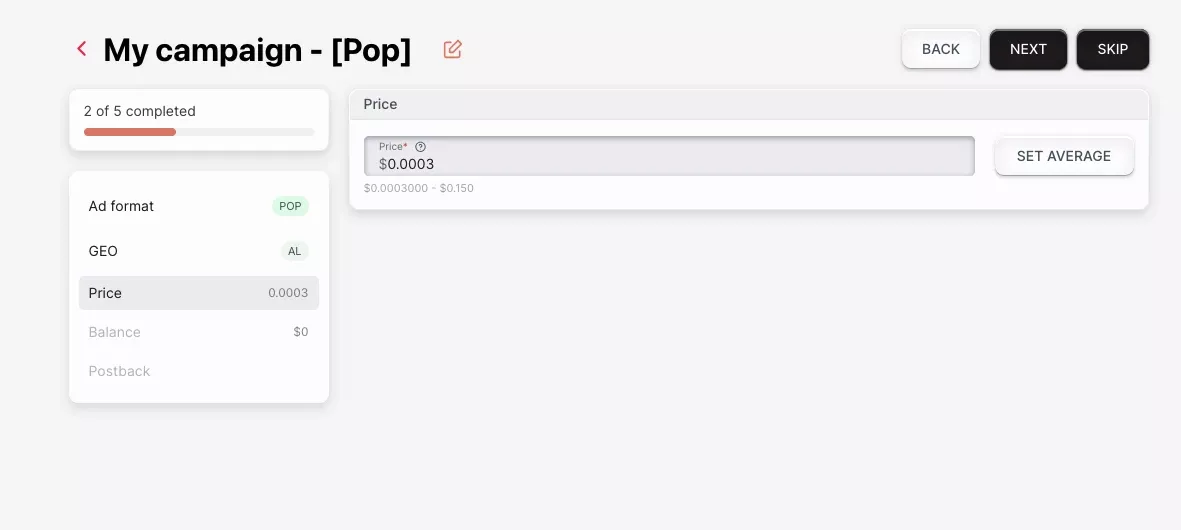
Users are not shown any intermediate ads, so popup campaigns can be set up in a matter of minutes, and only the landing page needs to be approved.
AdsCompass uses a “first-price” auction for popups. The winning advertiser pays the amount actually bid, without any “second-price” discount, so the amount specified in the campaign matches the amount in the report. Part of the market still uses the “second-price” model, so it’s worth clarifying this point before comparing bids across different sources.
People still ask me whether the bid decreases after the auction closes. No: on AdsCompass, the bid is the price, so it should be considered the final figure, not a starting point.
For self-service advertisers, the price for pop-under ads starts at $0.0003 per click. Pop, in-page push, and push ads are charged per click; the remaining five formats are charged per thousand impressions.
| Format | Pricing model | Minimum bid on AdsCompass |
|---|---|---|
| Pop | CPC | $0.0003 |
| In-page push | CPC | $0.0008 |
| Push | CPC | $0.001 |
| Banner | CPM | $0.001 |
| Telegram rewarded post | CPM | $0.01 |
| Native | CPM | $0.1 |
| Video pre-roll | CPM | $0.1 |
| Telegram rewarded video | CPM | $0.1 |
Per-click pricing on pop changes what the advertiser carries. Billing per thousand impressions charges for windows that open and are never registered as visits, while a CPC buy only costs when the visit lands. It also means a pop CPC and a pop CPM are not comparable as prices at all, because they bill on different events.
Current pop rates live in the Traffic Calculator, in the estimation tools section of the AdsCompass advertiser account, because the network has no fixed rate card. What a pop click costs depends on competing bids in that GEO, the device and connection mix of the source, and the time of day. The calculator reads from completed auctions and opens before any money is deposited. What it recommends shifts with the goal: buying the largest click volume in a GEO and buying the cheapest clicks in the same GEO produce different suggested bids off the same average.
Browser Blocking of Popunder Ads in 2026
Browsers do not block popunder ads outright in 2026, but they allow only a window opened in response to a user gesture. Popunder delivery therefore depends on user activation, and the format fires on a click and not on page load. Chrome, Safari and Firefox block windows opened without a user gesture, and each new window consumes that gesture, so one interaction opens exactly one window. A pop that tried to open by itself would never appear, and a script trying to open two would get one. That is browser policy, not a choice made by the network.
Ad blockers filter a further share: blocklists cover known pop scripts, so some requests never turn into a served window, and that share moves with GEO, device and browser mix. AdsCompass does not publish a figure for it, so treat any number quoted for blocked pop volume with suspicion.
Available pop volume in a GEO is therefore smaller than the size that GEO suggests. What the Traffic Calculator shows is already net of what never serves, so it is worth reading before a GEO is chosen.
Popunder Landing Page Patterns
Examples of popunder ads are landing pages, not creatives, so what is worth studying is page structure and not ad copy. A pop campaign has one asset to optimize.
| Page pattern | What it does | Offer types it suits |
|---|---|---|
| Direct offer page | States the proposition above the fold and asks for one action | Utilities, antivirus, VPN, software |
| Prelander | Acknowledges the arrival before selling, through a quiz, short article or eligibility check | Dating, sweepstakes, lead generation |
| Store or billing flow | Opens directly on an app store page or carrier billing screen | Mobile subscriptions, app installs |
Which Page Pattern Fits the Offer
A direct offer page works because a user arriving from a pop has no memory of clicking anything and needs the value proposition immediately. The page I am most often sent to look at is a long-scroll lander built for search traffic, and on pop it has to say what it is in the first screen or the window gets closed unread. Lift the offer, the price and the one action to the top of the page, and leave the trust blocks, the long explanation and the reviews below the fold where they cost nothing.
A prelander costs traffic at the extra step but filters out people who would never convert. The store and billing flow is mostly mobile, and it lives or dies on how few taps sit between the window opening and the charge.
Load Time and Language on Pop Landers
Load time counts for more on a pop lander than on a page the user chose to open, because a background window still rendering when the user finds it gets closed before anything is read. Language costs almost as much: pop traffic is geo-targeted, but a page served in the wrong language for the region converts at a fraction of the rate.
Campaign Moderation and Common Rejection Reasons
Moderation on AdsCompass checks destination URLs before a campaign runs and returns a verdict. The most common rejection is a reputation flag on the destination: a browser protection service or a security vendor has marked the domain as suspicious, and the moderation comment names which one. Malformed campaign links and terms violations account for most of the rest. Violent, weapons and drug-related content is not accepted.
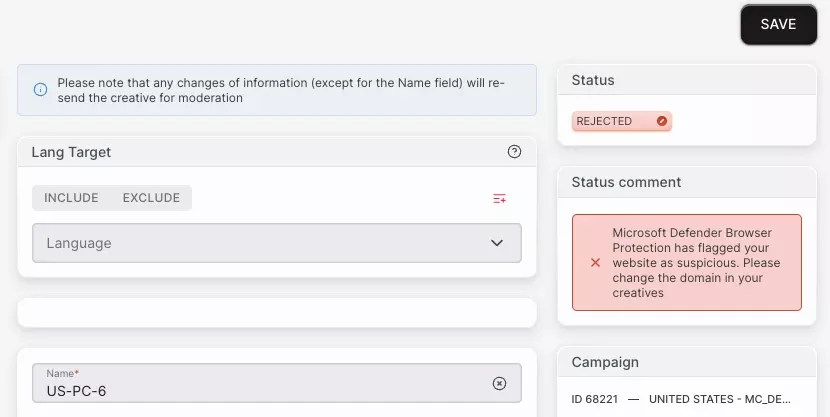
Advertisers query this rejection more than any other, because the link opens normally in their own browser and the verdict reads to them like an error. The flag usually attaches to something behind the link rather than to the offer: a long redirect chain, a shortened link, a tracker domain with history, or an address shared with other campaigns. Run the destination through VirusTotal before submitting, since it aggregates the vendors that raise these flags, then submit a link that resolves in as few hops as possible on a tracker domain used only for this traffic.
Popunder Ads Setup on AdsCompass
Launching a campaign with popunder ads on AdsCompass runs through nine points, and none of them involves producing a creative.
- Register an advertiser account; publisher registration is separate and uses a different panel.
- Deposit from $50 using any supported method.
- Check volume and current average bids for the intended GEO in the Traffic Calculator.
- Create a campaign and select Pop as the format.
- Add the destination URL, with tracking macros appended.
- Set GEO, device, operating system, browser, carrier and connection targeting.
- Set the CPC bid, starting from the $0.0003 floor and calibrated against the calculator average.
- Set daily and hourly budgets, the spend mode, the frequency cap and the schedule.
- Submit for moderation, then launch once approved.
Traffic in one GEO arrives from thousands of individual sources whose conversion rates differ by an order of magnitude. AdsCompass therefore reports and prices pop at the level of the source, not the GEO. Most of the work after launch happens there.
Targeting Filters on Pop Inventory
Targeting covers more than 200 countries plus city-level selection, device type, operating system and version, browser and version, ISP or carrier, browser language and connection type. Two filters matter specifically on pop: exclusion of IPv6 addresses and exclusion of proxy connections, both of which remove a share of automated traffic before it costs anything. Both are exposed as campaign-level filters, set before launch rather than requested from a manager.
Source ID Bidding for Per-Source Prices
Source ID bidding is the control that makes popunder manageable at scale. Every popunder source reports separately, and an advertiser can set an individual bid for a specific source ID rather than one price for the whole GEO. A source converting at twice the average gets a higher bid and more volume, a source burning clicks without conversions gets cut to the floor or blacklisted.
Lists of source IDs are uploaded in advance with a rule attached. Black and white lists also work at the IP, ISP and source level.
Frequency, Budget Pacing and Conversion Tracking
Frequency capping runs per unique IP per day, and the value is the advertiser's to set: there is no platform default. A tighter cap spreads the budget across more distinct users, a looser one gives the same user repeated chances to convert.
A tight cap and a loose one suit different offers, so the frequency cap is read off the first days of a test instead of guessed at launch. Scheduling covers time of day and day of week in a chosen timezone, budgets can be set daily and hourly, and the spend mode is either even across 24 hours or as fast as the auction allows.
Conversions come back through S2S postback, with platform macros for campaign ID, creative ID, price, IP, source ID, user agent and click ID. CPV Lab and CPV One have a documented integration; Keitaro, Binom, Voluum and RedTrack connect through postback templates.
Referrer Loss and Pop Attribution
Traffic from a pop window often reaches the landing page with no referrer, so pop sessions show up as direct in analytics instead of as paid traffic. The window is opened programmatically and the referring page is not always passed, so referrer-based attribution has nothing to read.
Stop relying on the referrer. Identifiers travel in the destination URL through the platform macros, so source ID, campaign ID and click ID reach the tracker whatever the browser does, and conversions match back through the S2S postback instead of through a session analytics never attributed.
Traffic Quality Controls on Pop Inventory
Quality on AdsCompass pop inventory is controlled at three points: publisher admission, automated filtering, and advertiser-side exclusions. Each site is premoderated before it can serve, antifraud screens bot traffic on an ongoing basis, and the advertiser adds the IPv6 and proxy exclusions plus source-level blacklists on top.
Publisher admission, antifraud and advertiser-side exclusions are all needed on pop because pop is the easiest format to fake. A fraudulent source only has to open a window, rather than simulate an ad view and a click on a creative.
Network-level filtering alone leaves an advertiser with no recourse when one specific source degrades. The per-source report is therefore a control surface, not a reporting convenience. Reporting runs in real time with breakdowns by day, hour, GEO and source, plus exports for external analysis.
When a campaign's numbers fall overnight, the source report is the first place I look, before the GEO or the bid.
Popunder Ads Monetization for Publishers
Publishers on AdsCompass monetize popunder ads alongside five other formats, using JS codes/widgets. Getting a placement live runs through seven points.
- Register a publisher account; advertiser registration is separate and uses a different panel.
- Add the site and submit it for premoderation.
- Choose the format, with popunder available alongside push, in-page push, native, banner and video pre-roll.
- Generate the placement as a widget.
- Install the code on the site, following the widget documentation in the publisher section.
- Watch the reports by date, widget, GEO, source and site once traffic starts clearing.
- Add a payout wallet in profile settings, then take payment on the applicable schedule.
Revenue from ad banners is determined by the same auction that sets prices for advertisers, so there are no fixed rates for publishers. A specific website’s revenue depends on the bids advertisers place for that audience; these bids vary based on geographic location, device composition, and ad format. Current metrics for a specific profile are displayed in the platform’s analytics tools, not in a published price list.
Each website undergoes preliminary moderation before ads begin running, and afterward, fraud protection filters weed out bot traffic. The network does not publish traffic volume thresholds for acceptance, and moderation is conducted on a case-by-case basis; therefore, even a small website should be submitted for review rather than assuming there is a minimum threshold.
FAQ