



In ad networks, traffic doesn't come from a single source — it comes from hundreds of zones: individual websites, apps, and placements. Some zones convert, others drain budget. The media buyer's job is to find the former and cut the latter. That's exactly what white- and black-lists are for: two tools that turn chaotic traffic buying into a managed process. I work with buyers at AdsCompass and see how the same campaign shows –40% ROI at launch and +80% a week later — without changing the creative, offer, or GEO. The only difference is zone management. At the same time, mistakes with lists happen just as often as mistakes in campaign setup. A premature black-list, someone else's white-list, lists that never get updated — all of it costs money. This guide is a concrete step-by-step strategy: from first launch to whitelist campaign, with data thresholds and honest tradeoffs.
Key Takeaways
- A black-list excludes non-performing zones, a white-list keeps only converting ones
- The RON → black-list → whitelist campaign strategy is the standard optimization cycle
- Minimum 200–500 clicks per zone (for pop/push CPC) before a black-list decision
- Another buyer's white-list won't work for you — results depend on creative and offer
- Lists go stale: review every 2–4 weeks

What Are White-Lists and Black-Lists in Media Buying
In the context of ad networks, a white-list and a black-list are lists of zones (source IDs) that determine where a campaign receives traffic from. A black-list excludes specific zones: the campaign runs everywhere except zones on the list. A white-list works the opposite way: the campaign runs only on zones from the list, all other traffic is ignored. A zone is a specific website or placement within the ad network. Each zone has a unique ID, which is passed to the tracker via a subID parameter. It's precisely subID that links a conversion in the tracker to a specific zone in the ad network — without this link, zone-level optimization is impossible. Per IAB standards, traffic source transparency and the ability to manage placements at the zone level are baseline requirements for any advertising platform.
The RON → Black-List → Whitelist Campaign Strategy
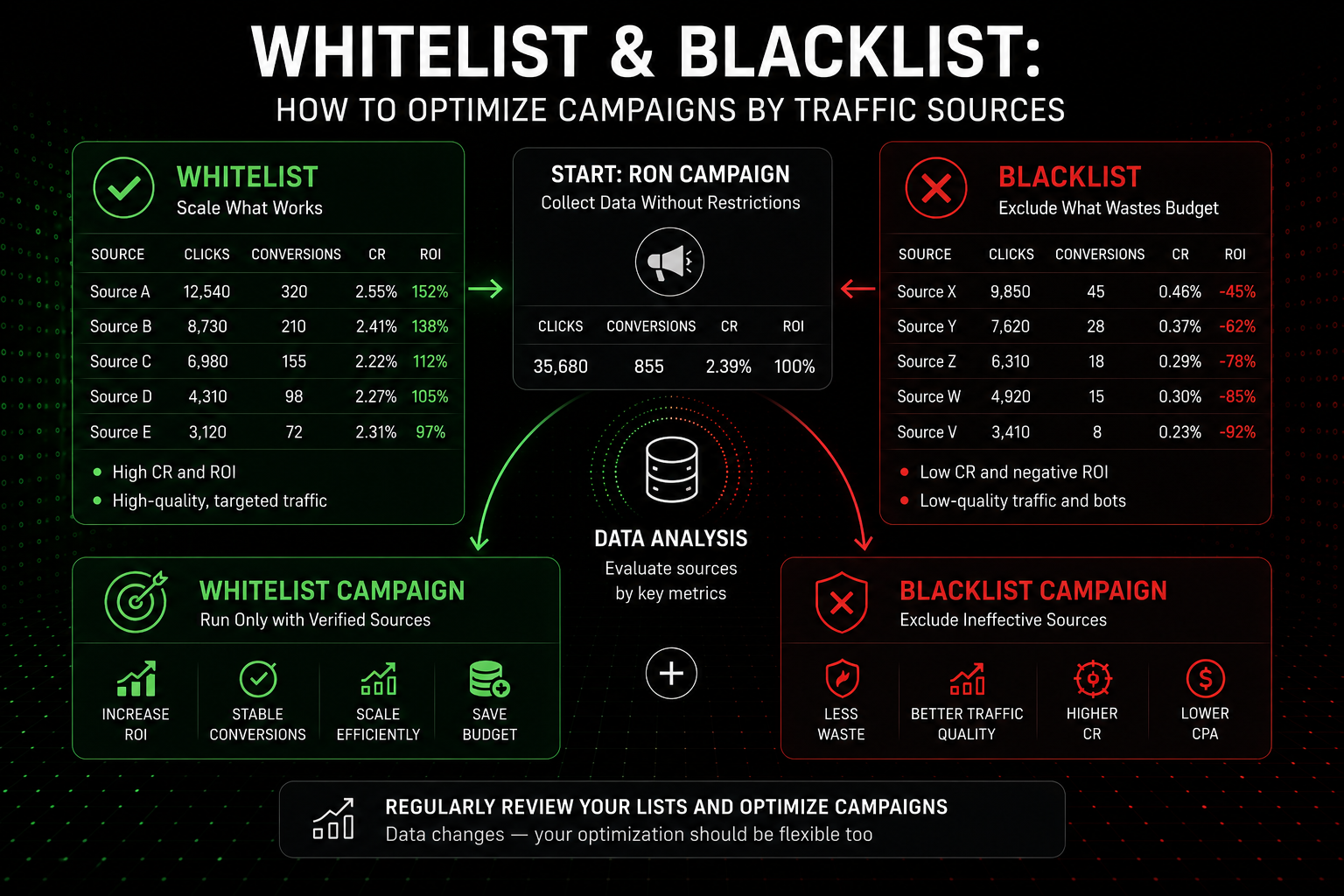
This is the standard optimization cycle used by media buyers at all levels. Three steps, each built on data from the previous one. The core principle: start broad, collect data, narrow down to working sources. The cycle repeats — the RON campaign continues discovering new zones while the whitelist campaign scales the ones already found. Two campaigns run in parallel: one for discovery, the other for performance. The most common beginner mistake is stopping at one stage: either running RON forever without optimizing, or launching a whitelist and forgetting to search for new sources.
Step 1: RON Campaign — Data Collection
RON (Run of Network) is a campaign with no zone restrictions. Traffic comes from all available sources. The goal of RON isn't profit — it's data. You launch a campaign on one GEO, one format, one device type, and let it run for 48–72 hours with a daily limit of $10–20. During this time, each zone accumulates enough clicks for an initial evaluation. In the tracker (via Voluum, Keitaro, Binom, or another), you see conversions tied to zone_id through subID. A RON campaign is a filter. It burns part of the budget on non-performing zones, but that's the cost of data. Without RON, you have no material for building lists.
Step 2: Black-List — Cutting Non-Performing Zones
After 48–72 hours, open the tracker and filter zones by conversions. Zones with sufficient clicks (200–500 for pop, 50–100 for push) and zero conversions are black-list candidates. Add them to the RON campaign's exclusions. Zones with insufficient data should be left running — they need more time. The black-list isn't static: every 2–3 days, review the data and add new non-performing zones. The RON campaign keeps running, but with each cycle it spends less on junk traffic.
Step 3: Whitelist Campaign — Scaling Performing Zones
In parallel with building the black-list, you identify zones with conversions. Once you've accumulated 10–20+ such zones, create a separate campaign targeting only those zones (a whitelist campaign). Increase the bid by 10–20% — this gives auction priority and higher volume from verified sources. The whitelist campaign is your performance channel, RON is your discovery channel. Both run simultaneously.
How Much Data Is Needed Before Making a Decision?
This is the most common question, and the answer depends on format and pricing model. For CPC formats (pop, push, in-page), the benchmark is clicks per zone. Minimum threshold for black-listing: 200–500 clicks with no conversions for pop, 50–100 clicks for push. If a zone has accumulated 50 clicks and 0 conversions, that's not grounds for a black-list — that's noise. If it's accumulated 500 clicks and 0 conversions, the decision is justified.
For white-listing, the threshold is higher: a zone should deliver at least 2–3 conversions at an acceptable CPA before it can be considered consistently performing. A single conversion could be a fluke.
In terms of time: minimum 48 hours for pop, 72 hours for push. This timeframe is needed not just to accumulate clicks, but to account for daily traffic fluctuations. A zone that doesn't convert in the morning may convert in the evening — and vice versa.
Honest tradeoff: stricter thresholds (500+ clicks) produce more accurate decisions but cost more in testing budget. Looser thresholds (100 clicks) save budget but increase the risk of wrongly black-listing a zone. For budgets under 200/month, 200 clicks is optimal. For 500+, aim for 500 clicks.
What Mistakes Kill Zone Optimization
The first: premature black-listing. A zone with 30 clicks and 0 conversions isn't a "bad zone" — it's a zone without data. Cutting it means potentially losing a working source. Let the zone accumulate statistics before making a decision.
The second: using someone else's white-list. Another buyer's white-list was built for their offer, their creative, and their GEO. A zone that converts a dating offer may deliver zero conversions for finance. According to Statista, user behavior varies significantly across verticals and GEOs. The only reliable white-list is the one you've built yourself.
The third: lists that never get updated. A zone that converted a month ago may have stopped working: the publisher changed content, competitors outbid you, the audience burned out. Review lists every 2–4 weeks. Zones that stopped converting in the whitelist campaign go back to RON for retesting or into the black-list.
The fourth: whitelist without RON. If you launched a whitelist campaign and stopped RON, no new performing zones will be found. The whitelist gradually shrinks as zones burn out, and revenue declines. The RON campaign should run continuously as a source of new zones for the whitelist.
Can You Use White-List and Black-List Simultaneously?
Yes, and it's the recommended strategy. On AdsCompass, a single campaign can use only one list type (black or white). So the optimal approach is two parallel campaigns. First: a RON campaign with a black-list. It runs across all zones except those already filtered out. Bid is baseline or slightly lower. Goal — discovery: finding new converting zones and cutting non-performers. Second: a whitelist campaign. Only verified zones. Bid 10–20% above baseline. Goal — performance: maximum conversions from proven sources.
The RON campaign "feeds" the whitelist: as soon as RON finds a new converting zone, it's added to the whitelist campaign. The cycle is continuous.
How to Work with White- and Black-Lists on AdsCompass
On AdsCompass, white- and black-lists are managed from the self-serve advertiser dashboard. When creating or editing a campaign, you specify a list of zone IDs for inclusion (white) or exclusion (black). Zone-level statistics are available in real time with breakdowns by clicks, conversions (with S2S postback configured), GEO, device, and OS.
For full list management, a tracker with subID integration is required. AdsCompass supports S2S postback with Keitaro, Binom, RedTrack, Voluum, BeMob, and PeerClick. The zone_id token is passed in the campaign URL and lets you see conversions per zone in the tracker — lists are built precisely on this data.
The platform operates on CPC (pop, push, in-page) and CPM (native, banners, pre-roll, TMA) models, covers 200+ GEOs, and provides a full set of formats. A proprietary anti-fraud system filters invalid traffic at the impression stage, reducing the number of junk zones before your manual optimization even begins. For publishers, clean zones mean better reputation and higher bids from advertisers.
FAQ
Can I use another buyer's white-list?
Not recommended. Zones convert differently for different offers, creatives, and GEOs. A white-list that works for dating in Brazil may not deliver a single conversion for utilities in Indonesia. The only reliable method is building lists yourself through RON testing.
How often should lists be updated?
Every 2–4 weeks. Zones burn out: publishers change content, auction competition increases, audiences stop responding. Zones from the whitelist that stopped converting should be moved to RON for retesting or to the black-list.
What is a RON campaign?
RON (Run of Network) is a campaign with no zone restrictions: traffic comes from all available sources in the ad network. The goal of RON is collecting data to build white- and black-lists. A RON campaign runs continuously as a discovery channel alongside the whitelist campaign.
Do lists work the same way for all formats?
The principle is the same, but data thresholds differ. For pop (CPC) — 200–500 clicks per zone before black-listing. For push (CPC) — 50–100 clicks. For CPM formats (native, banners), the benchmark is impression count and CTR, not clicks. On AdsCompass, lists are available for all formats.
How many zones should a white-list contain?
It depends on GEO and format. To start, 10–20 zones is sufficient. Fewer than 5 is too narrow — there won't be enough volume for stable performance. More than 100 — the whitelist loses its purpose as it stops filtering effectively. The optimal range for a single GEO: 15–50 zones.
What should I do if the whitelist campaign stops converting?
Three actions. First: check whether zones have burned out — review statistics for the last 7 days and remove zones with zero conversions. Second: check the creative — the landing page or push copy may be outdated. Third: check the RON campaign — if it's not running, no new zones are flowing in, and the whitelist is gradually depleting.
About the Author
Vlada, Business Developer at AdsCompass. Works with advertisers and publishers in digital advertising, specializing in performance formats and international markets. Helps partners build traffic acquisition and monetization strategies across 200+ GEOs.