



Most advertising launch guides are written for Google Ads or Meta — platforms where a beginner competes against major brand budgets and faces $5–15 before the first click even lands.
In ad networks running push, pop, in-page, and native formats, the economics are different. CPC starting at 0.01, and the ability to collect optimization data in a day rather than a week. But a low entry threshold doesn't mean it's simple. I regularly see AdsCompass accounts where the first test budget burns through in an hour — not because the traffic is bad, but because the campaign was set up without understanding the basics. This guide walks you from registration to first optimization — step by step, with specific numbers and the mistakes that cost money most often.
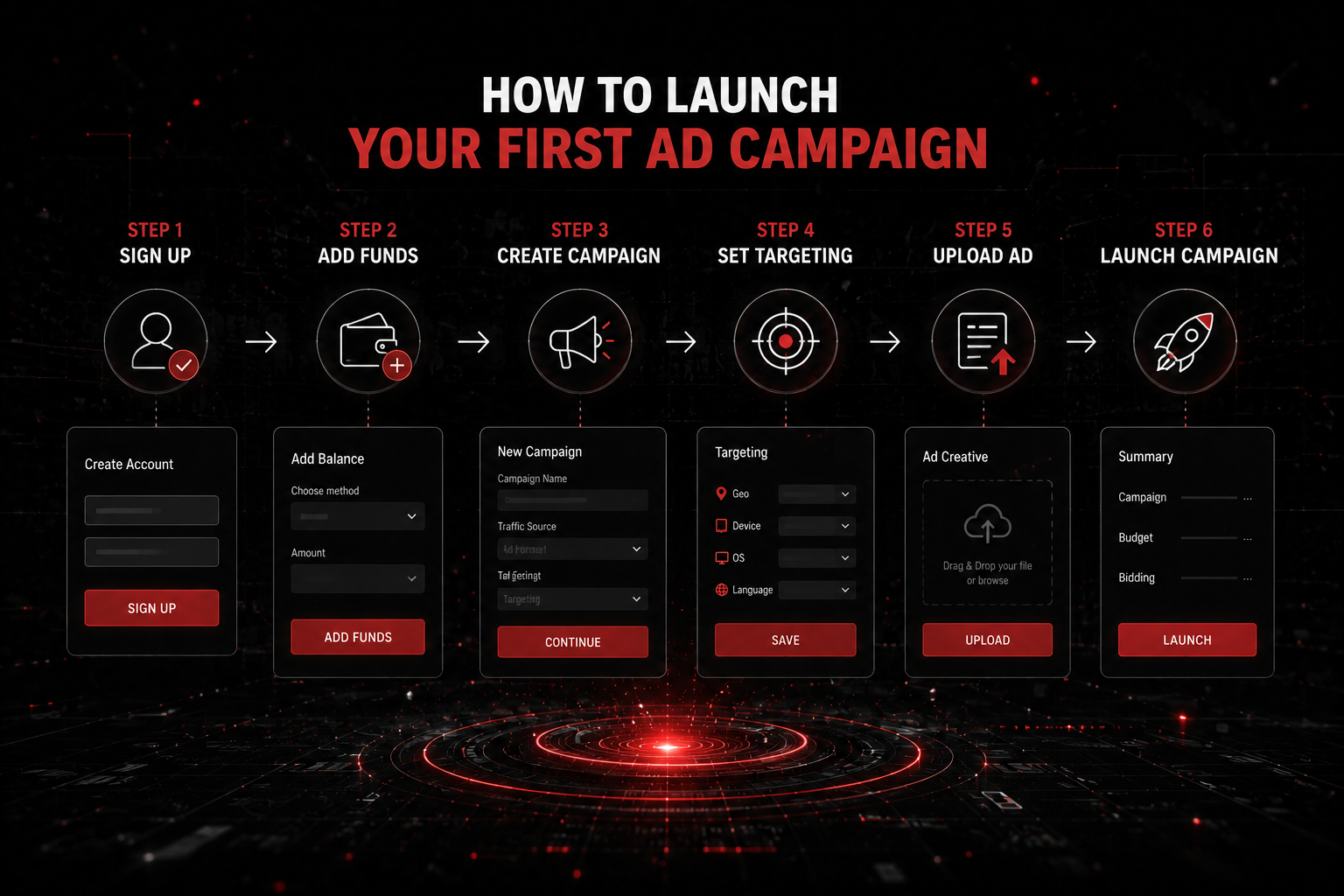
- The minimum deposit on AdsCompass is $50, enough for a first test
- Pop is the optimal format to start with: maximum data volume at minimum spend
- One campaign = one GEO, one format, one device type
- The first 24–48 hours are for collecting data, not optimizing
- The goal of a first test is data for decisions, not profit
Getting Started: Registration and First Deposit
The first step is registering on the platform. On AdsCompass, the process takes a few minutes: email, contact details, password. After verifying your account via email, you gain access to the self-serve dashboard. The next step is funding your balance. The minimum deposit is $50, with PayPal, Crypto, Stripe, Paxum, WebMoney, and Wire Transfer available. Recommendation for a first test: don't deposit more than $100–150. That's enough to test one setup (format + GEO + creative) and collect data for initial conclusions. Depositing $500 at the start is a common mistake: without understanding how to read statistics, a larger budget simply drains faster. Before launching a campaign, check the Traffic Calculator (Estimation Tools) section in the AdsCompass advertiser dashboard — it shows current volumes and rates by GEO and format.
Which Format to Choose for Your First Campaign?
For a first launch, pop is optimal. Not because it's the "best" format in an absolute sense, but because it solves the beginner's main task: quickly collecting enough data at minimal cost. Pop runs on CPC — you pay for each click, not for impressions. Cost per click starts at $0.01 in Tier-3, fill rate is close to 100%, and statistics accumulate within a single day. This lets you see within one to two days which zones convert and which don't, and make your first optimization decisions.
Push and in-page also run on CPC and work well for subsequent tests, but they're more complex for a beginner: you need a creative (headline + description + icon), CTR heavily depends on copy quality, and data collection takes longer. Native, banners, and video pre-roll are sold on CPM — you pay per 1,000 impressions. These formats make sense to add once you've mastered the basic "launch → statistics → optimization" loop on pop. The full list of AdsCompass formats is available on the website — I recommend studying them before launch so you understand what you'll be working with next.
How to Set Up a Campaign: Targeting, Bids, Creatives
Campaign setup is the moment where money is lost most often. Not because the interface is complex, but because of the attempt to cover "everything at once." The main rule for a first launch: the narrower the settings, the easier it is to interpret results. If a single campaign mixes five GEOs, two device types, and three formats — understanding what actually worked will be impossible. The right approach: one campaign = one GEO, one format, one device type. This produces clean data on which you can base decisions. Per IAB standards, transparent campaign segmentation is a baseline requirement in media buying.
GEO and Devices
For a first test, choose one GEO from Tier-2 or Tier-3: Indonesia, Brazil, India, the Philippines. Device — mobile Android. In Tier-2/3, the Android share reaches 90%, making it the primary traffic source by volume. Test desktop and iOS separately, after initial results.
Bids: CPC or CPM
Don't lower the bid to "save money": a CPC that's too low means you'll receive residual traffic from the worst zones. Native, banners, and video pre-roll run on CPM — you pay per 1,000 impressions. These formats require a larger test budget and are better suited for more experienced buyers. Pop, push, and in-page are sold on CPC — you pay per click.
Creatives and Landing Page
For pop, the creative is the landing page the user arrives at. It should load fast (under 3 seconds), be optimized for mobile devices, and contain a clear call-to-action. For push — a headline (up to 30 characters), description (up to 60 characters), and an icon. Launch at least 3–5 creative variations simultaneously: without A/B testing, understanding what works is impossible.
How to Read Statistics and What to Watch in the First 24–48 Hours
The first day after launch is data collection time, not optimization time. A common mistake: two hours after launch, starting to disable zones because there are "no conversions." With a 50-100 dollars budget and 0.01-0.03 CPC, in two hours you'll get a few hundred clicks — that's statistically insufficient for conclusions. Let the campaign run for at least 24 hours before making decisions.
After 24–48 hours, open your statistics by zone (source ID) and review key metrics. On AdsCompass, statistics are available in real time with breakdowns by GEO, zone, device, and OS. What to look for: click distribution across zones (if one zone takes 80%+ of the budget — that's a red flag), zone-level CTR for push (working range 0.5–1.5%, above 5% — fraud suspicion), zone-level CR (0% conversions at 500+ clicks — zone goes to black-list), bounce rate by source (consistently >90% — low-quality traffic), budget spend rate (the entire daily limit gone in 1–2 hours means the bid is too high or targeting is too broad).
What Mistakes Kill Budget on a First Launch
Over my time at AdsCompass, I've seen the same mistakes dozens of times. The first and most expensive: launching without a budget limit and frequency cap. Without a daily cap, a campaign can burn through the entire deposit in a few hours, especially on pop with its high volume. Always set a daily budget cap — for a first test, 10–20 dollars per day is enough.
The second mistake: multiple GEOs in one campaign. Indonesia and Brazil are two fundamentally different markets with different user behavior. Mixing them makes it impossible to understand what's working.
The third: no tracking. Without S2S postback or a conversion pixel, you see clicks but not what happens after. It's like driving a car with the speedometer covered.
The fourth: optimizing too early. Disabling a zone after 50 clicks is a statistical error. Let each zone accumulate at least 200–500 clicks (for pop) or 50–100 clicks (for push) before making a decision.
First Optimization: White-Lists, Black-Lists, Bids
After 48–72 hours of campaign operation, you'll have enough data for your first optimization. Open statistics by zone and divide them into three groups. First: zones with conversions — this is your white-list. Second: zones with sufficient click volume but zero conversions — black-list. Third: zones with insufficient data — leave them running until the next optimization cycle. Create a new campaign targeting only white-list zones and increase the bid by 10–20% — this gives auction priority and better traffic from verified sources. Exclude black-list zones. Repeat the cycle every 2–3 days. Optimization is an iterative process: each cycle narrows traffic to working sources and improves efficiency. On AdsCompass, white- and black-lists are managed from the self-serve dashboard, and the built-in anti-fraud system additionally filters out low-quality zones at the impression stage.
How to Launch Your First Campaign on AdsCompass
AdsCompass is a self-serve platform where the entire journey from registration to optimization happens within one dashboard. Minimum deposit 50 dollars, access to pop, push, in-page, native, banners, video pre-roll, and Telegram Mini-App formats. Targeting by GEO, device, OS, and carrier. White- and black-lists by zone. Real-time statistics with breakdowns across all parameters. Traffic Calculator shows current volumes and recommended rates before launch — so you don't waste time on GEOs where traffic is insufficient for testing. The platform operates on CPC (pop, push, in-page) and CPM (native, banners, video pre-roll, TMA) models, covers 200+ GEOs, and processes over 900 million impressions daily. A proprietary anti-fraud system filters invalid traffic, and direct integrations with publishers ensure source quality control. For tracking, S2S postback integrations are supported with major trackers: Voluum, Keitaro, Binom, RedTrack, BeMob.
Algorithm for your first launch: registration → deposit 50–100 → choose pop format → one Tier-2/3 GEO → mobile Android → daily limit 10–20 → 24–48 hours of data collection → analyze by zone → white/black-lists → repeat.
FAQ
How much money do I need for a first test?
50–100 is enough for one setup (format + GEO + creative) on pop. For push — 30–50 for one GEO at 0.01–0.03 CPC. The goal of a first test is to collect optimization data, not to turn a profit.
Do I need a tracker to launch a campaign?
Strongly recommended. Without a tracker, you see clicks but not conversions by zone. S2S postback trackers (Voluum, Keitaro, Binom, RedTrack, BeMob) integrate with AdsCompass and provide a complete picture from click to conversion.
How long does it take to collect enough statistics?
At least 24 hours for pop, 48–72 hours for push. During this time, each zone will accumulate enough clicks for statistically meaningful conclusions. Optimizing sooner means making decisions on noise, not data.
Can I run multiple GEOs in one campaign?
Technically — yes. Practically — not recommended for a first test. Different GEOs have different rates, behavior, and conversion patterns. Mixing GEOs in one campaign makes statistics unreadable. One GEO per campaign is standard practice.
What should I do if the campaign isn't converting?
Check three things. First: is tracking working (are postback conversions coming through). Second: is there enough data (at least 200–500 clicks per zone for pop). Third: is the landing page relevant to the GEO audience (language, visuals, offer). If everything checks out and there are still no conversions after 48 hours — switch the GEO or format.
What CTR is considered normal for push and pop?
For push: 0.5–1.5% is a working range, above 2% is an excellent result. For pop, CTR doesn't apply in the traditional sense because the format opens automatically. The relevant benchmark here is CR (post-click conversion rate), which depends on the offer and landing page.
About the Author
Vlada, Business Developer at AdsCompass. Works with advertisers and publishers in digital advertising, specializing in performance formats and international markets. Helps partners build traffic acquisition and monetization strategies across 200+ GEOs.